Time Management

Employee Time Clock Software for Teams

All-in-One Time Clock and Attendance Tracking

Manage time, attendance, and paid leave effortlessly to boost productivity and simplify your workflow.
Time Tracking

Simplified Time Management for Your Team

Replace paper time cards and manual spreadsheets with employee time clock software that does the work for you

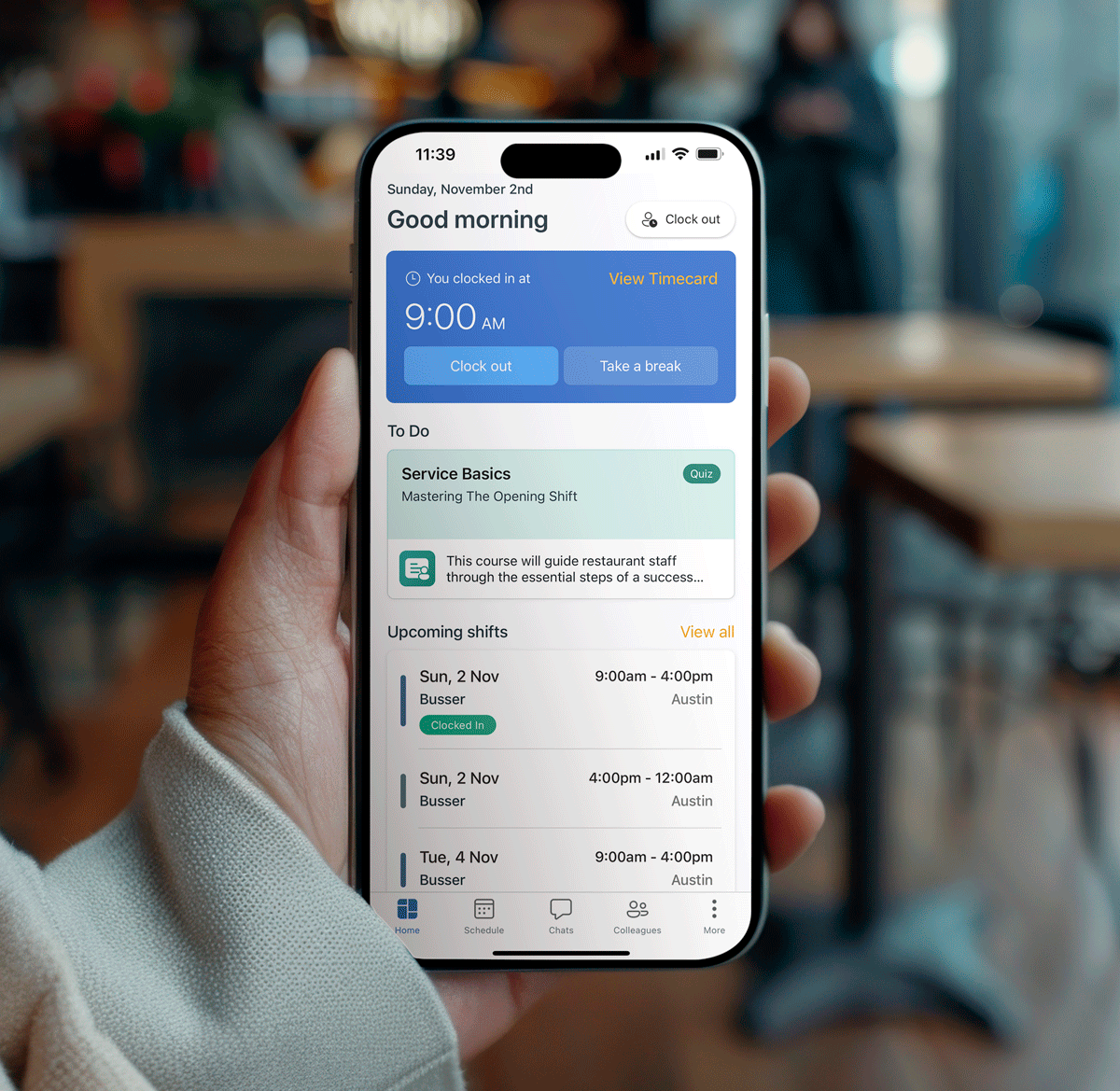
Real-Time Clock-In and Clock-Out: Employees clock in and out from mobile devices, shared kiosks, or web browsers, giving you live employee time tracking.

Clear View of Work Hours: See daily and weekly employee hours at a glance so you can spot missed punches and overtime before payroll.

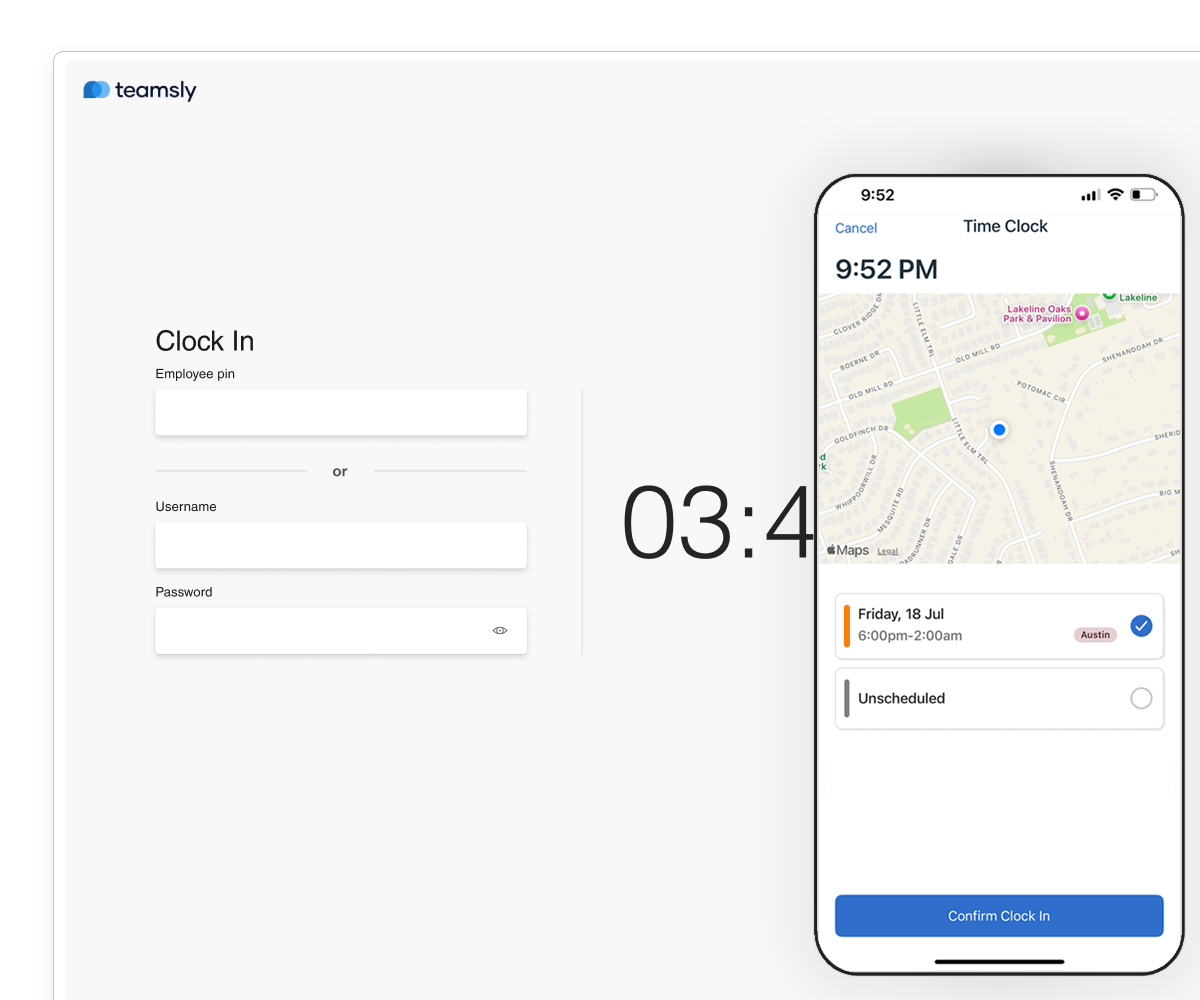
Enhanced Accountability with Geo-Fencing: Ensure clock-ins happen at authorized locations, reducing time theft and increasing trust.

Advanced Controls

Smart Timekeeping with Advanced Controls

Protect your time clock system from abuse and keep records clean. teamsly helps reduce errors, prevent buddy punching, and keep you compliant.

Wage-Based Roles & Break Management: Tailor time-tracking to specific roles and manage breaks efficiently to stay compliant with labor laws.

Clock-In Security & Automation: Use PINS for secure clock-ins, prevent early clock-ins, and set up auto clock-out to ensure accuracy.

Real-Time Alerts for Better Oversight: Get notified when someone forgets to clock out, hits overtime, or breaks a rule, so you can fix issues fast.

Timesheet Management

Effortless Timesheets for Accurate Payroll

Each punch flows into a clean time card and timesheet in our time clock app, so payroll stays fast and accurate.

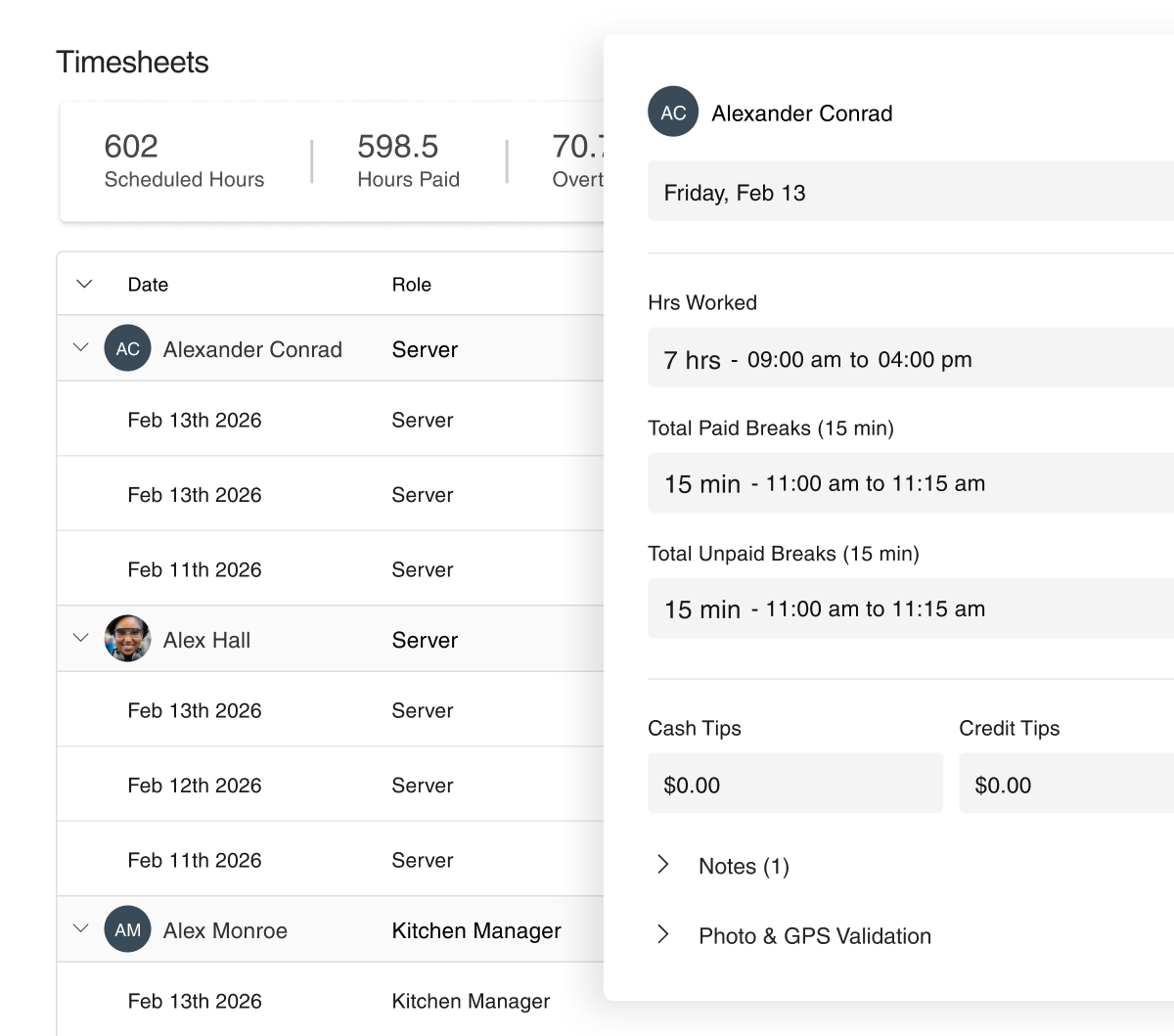
Flexible Timecard Management: Edit timecards, set payroll periods, and apply role-based wage rates to ensure accurate records.

Comprehensive Tip & Wage Management: Track and manage tips and wages directly on timecards, simplifying payroll calculations.

Smart Alerts & Easy Export: Receive alerts for missing breaks and overtime, and seamlessly export timesheets to your payroll provider for hassle-free processing.
PAYROLL EXPORTS

Timesheet Exports That Fit Your Payroll Workflow

Turn approved timesheets into payroll-ready exports that match your provider’s format and make processing faster for your team.

Provider-Friendly Formatting: Export timesheets in a structure that works with your existing payroll system.

Customizable Data Output: Include the fields your provider needs, from regular hours to overtime, PTO, and more.

Faster Payroll Processing: Spend less time reformatting timesheets and more time getting payroll submitted accurately.

Ready to Simplify Time Management?

Discover how our time clock app can streamline employee time and attendance and boost efficiency.

Real-Time Clock-In

Geo-Fencing

Auto Clock-Out

Clock in Notifications

Overtime Alerts

Android & IOS App

Timesheets

Break Management

Tip Management

PTO Accrual Tracking

Tenure accrual

Wage-Based Roles

Real-Time Clock-In

Geo-Fencing

Auto Clock-Out

Clock in Notifications

Overtime Alerts

Android & IOS App

Timesheets

Break Management

Tip Management

PTO Accrual Tracking

Tenure accrual

Wage-Based Roles

pto & sick Leave

Comprehensive PTO & Sick Leave Management

Go beyond a basic time clock with PTO tracking and clear rules for vacation, sick, and personal time.

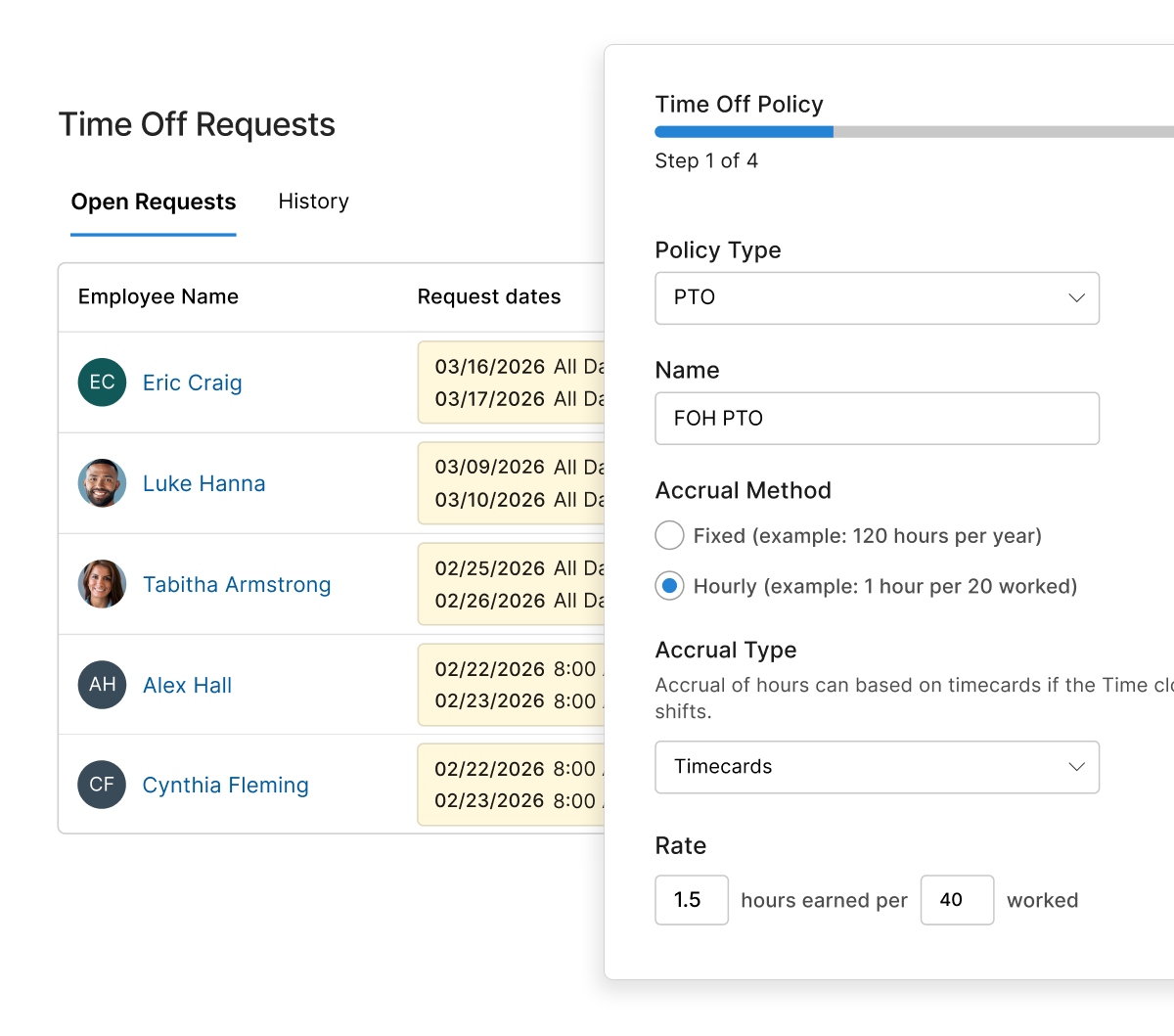
Custom Policies: Set different PTO rules for hourly and salary staff, or by location, so each group has the right coverage.

Accrual and Balance Tracking: Track earned time, used time, and remaining balances without spreadsheets.

Request and Approval Flow: Require advance notice for time-off requests, manage negative balances, and set carryover limits to maintain control and compliance.
LOCATION TRACKING

Geo-Fence Clock-Ins & Live Location Tracking

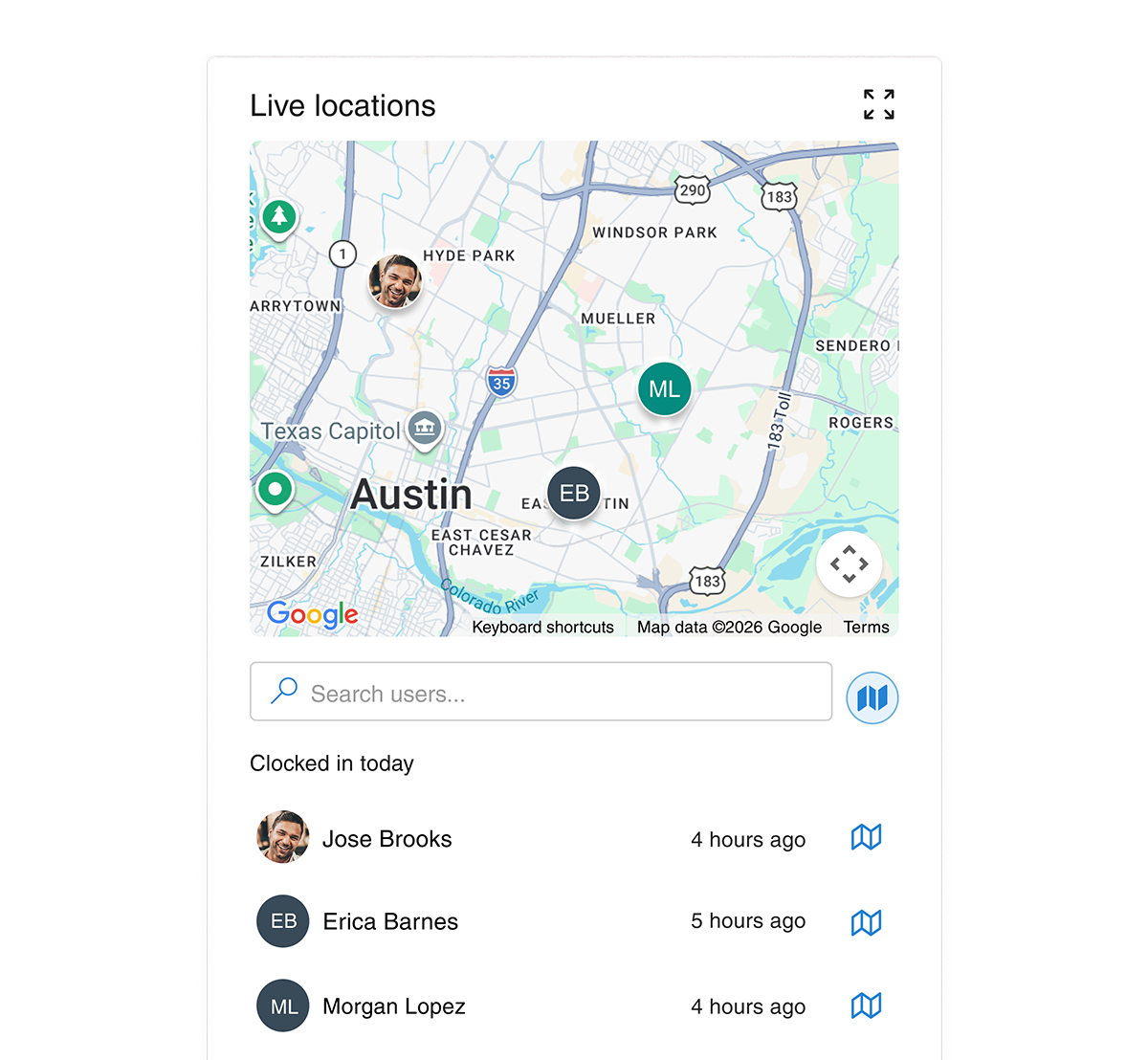
Stay connected with your mobile workforce in real-time. Monitor live GPS locations and set automated boundaries to ensure your team is on-site, on-route, and on-schedule.

Smart Geo-fencing: Limit mobile clock-ins to a specific radius around an address to ensure employees are physically at the job site before their shift starts.

Real-Time Location Monitoring: View active users on a live manager dashboard during working hours to coordinate tasks and respond to field updates instantly.

Automated Route Tracking: Track the exact path your team takes throughout the workday to optimize travel time, verify site visits, and improve operational efficiency.

Ready to simplify your scheduling

Try teamsly free for 30 days

Time Clock Feature Overview

Timesheets

All your employee timecards in one place. Review hours, catch issues, and get clean data ready for payroll every period.

Planned vs Actual Hours

Compare scheduled hours against actual punched hours on every timesheet so you can spot variance, unapproved overtime, and labor leakage at a glance.

Timesheet Issues Column

A dedicated issues column flags missed punches, late clock-ins, geofence violations, and timecard conflicts so managers can fix problems before payroll runs.

Pay Rate per Role

Assign hourly wages by role and employee. Timesheets and payroll exports automatically calculate estimated pay using the right rate for every shift worked.

Payroll Period Setup

Configure weekly, bi-weekly, semi-monthly, or 4-week payroll cycles with a custom start day so timesheets always align with how you actually pay your team.

Punch Rounding Rules

Round clock-in and clock-out times to the nearest 5, 10, or 15 minutes. Apply consistent rounding across the entire workforce to simplify payroll.

Absence History

Track every absence, no-show, and time-off event in a single history log so you have full context when reviewing attendance trends.

Absence & PTO Policies

Define paid time off, sick leave, and unpaid absence policies with accrual rules. Approved time off automatically appears on timesheets and payroll exports.

Shift Conflict Detection

Surface overlapping timecards, double-booked shifts, and impossible punch sequences before they hit payroll, keeping every timesheet clean.

Payroll Exports

Export timesheet data as CSV or directly to popular payroll providers. Include hours, overtime, breaks, tips, and pay totals in one accurate file.

Add Notes to Timecards

Attach manager notes to any timecard to document edits, approvals, or context. Notes stay with the timesheet for a full audit trail.

Timesheet Filters & Search

Filter timesheets by employee, role, department, date range, or issue type to quickly find the timecards that need attention.

Estimated Pay Totals

See live estimated pay, scheduled hours, hours paid, overtime, and paid breaks at the top of every timesheet view for instant payroll insight.

Overtime

Stay ahead of overtime costs with automatic daily, weekly, and pay-period overtime tracking that follows U.S. labor rules.

Daily Overtime Rules

Trigger overtime pay after a configurable number of hours in a single day, with separate thresholds for time-and-a-half and double-time.

Weekly Overtime Rules

Calculate weekly overtime automatically once an employee crosses your defined hours-per-week threshold, with a custom pay multiplier.

Payroll-Period Overtime

Apply overtime calculations across your full payroll period, not just a single week, so multi-week pay cycles stay accurate and compliant.

Overtime Pay Multipliers

Set custom multipliers like 1.5x or 2x for each overtime tier. Multipliers flow straight into timesheets and payroll exports automatically.

Approaching-Overtime Alerts

Notify managers as soon as employees get close to their weekly overtime threshold so you can adjust schedules before extra costs hit.

Salaried Overtime Threshold

Calculate overtime for salaried employees below a configurable annual salary threshold to stay compliant with FLSA exemption rules.

GPS & Location Tracking

Know where work is happening. Capture GPS at every punch and visualize your team's day on the map.

GPS Clock-In Capture

Record exact GPS coordinates for every clock-in, clock-out, and break event so you always have proof of where mobile employees punched.

Geo-Fenced Job Sites

Restrict mobile clock-ins to a defined radius around any address. Block off-site punches and keep timesheets honest at every job site.

Live Map View

See where every clocked-in employee is right now on a live map. Perfect for dispatch, field service, and multi-location operations.

Route Breadcrumbs

Replay an employee's full route during their shift with timestamped breadcrumb tracking so you can verify visits and travel time.

Real-Time Location Tracking

Monitor live GPS location during working hours only. Toggle real-time tracking on or off to balance visibility with employee privacy.

Multi-Site Geofencing

Configure separate geofences for each location, branch, or job site. Employees can only clock in when they're actually on the right property.

Break Management

Stay compliant with paid, unpaid, mandatory, and automatic breaks tailored to each role.

Manual Breaks

Let employees start and stop their own breaks from the mobile time clock so break duration is captured accurately on every timesheet.

Mandatory vs Optional Breaks

Configure each break as mandatory or optional. Mandatory breaks are enforced by the time clock to keep your business compliant with labor law.

Paid & Unpaid Break Types

Mark breaks as paid or unpaid. Paid breaks roll into hours paid; unpaid breaks are deducted automatically from total time worked.

Automatic Break Deductions

Auto-deduct an unpaid break of any length once an employee crosses a daily hours threshold, with no manual punching required.

Break-Per-Hours-Worked Rules

Define break rules like "15 minutes for every 4 hours worked" and stack multiple rules to match meal-and-rest requirements in any state.

Schedule Enforcements

Customize how the time clock behaves so employees punch in the right way, every shift.

Late Clock-In Detection

Automatically flag employees as late once they clock in a configurable number of minutes after their scheduled shift start time.

Early Clock-In Prevention

Stop employees from clocking in too early to control unplanned labor costs. Block punches more than X minutes before the shift start.

Clock-Out Reminders

Send push or text reminders to employees who haven't clocked out after their shift ends so missed punches stop showing up on timesheets.

Cash Tip Declaration

Prompt employees to declare cash tips when their shift ends. Captured tip totals flow into payroll exports for restaurant and hospitality teams.

Auto Clock-Out

Automatically clock employees out a set number of minutes after their scheduled shift ends. Never worry about missed clock-outs again.

Manager Override on Restrictions

Give managers the ability to override early clock-in blocks and other enforcement rules when business needs require flexibility.

General Time Clock

Flexible clock-in options that fit how your team actually works — scheduled, unscheduled, mobile, or kiosk.

Clock In From Any Device

Employees can punch in from a phone, tablet, shared kiosk, or web browser. The time clock works wherever your team works.

Mobile Time Clock

A clean mobile clock-in screen lets employees start their day in seconds, with optional GPS, photo, and shift selection built in.

Unscheduled Shift Clock-In

Allow employees to clock in even when they don't have a scheduled shift. Perfect for on-call, callout, and flexible workforces.

Add Timecard (Manual Entry)

Managers can add or edit timecards directly from the timesheet to fix missed punches and document approved adjustments.

Timesheet Export / Download

Download any timesheet view as a CSV or PDF in one click. Share clean reports with payroll, accounting, or your bookkeeper.

Payroll Summary Export

Generate a payroll-ready summary with payroll IDs, regular hours, overtime, scheduled vs actual hours, and total pay per employee.

On-Call Shift Timekeeping

When a standby employee gets called in, the time clock tracks it as a distinct event — separate timesheet rows, accurate pay, and no overtime surprises.

Separate On-Call Timesheet Rows

On-call shifts appear as a dedicated "On-Call" row on timesheets. When the employee clocks in, a second "Called-In" row captures actual worked hours separately.

Called-In Pay Multiplier on Timesheets

The pay multiplier set in scheduling flows automatically into timesheet calculations the moment a called-in clock-in is recorded — no manual adjustment needed.

On-Call Time Excluded From Overtime

Standby hours never inflate overtime totals. Only actual worked time after being called in counts toward weekly and daily overtime thresholds.

Notifications & Alerts

Keep managers and employees informed with the right reminder at the right time across email, push, and SMS.

Customizable Notifications

Turn each notification on or off per user and per channel. Build a quiet, focused alert experience that fits how each person works.

Clock-In Reminders

Push a friendly reminder to employees right before their shift so they punch in on time and avoid being marked late.

Clock-Out Reminders

Remind employees to clock out at the end of their shift so missed punches and timecard issues stop slipping through to payroll.

Break-Return Reminders

Notify employees when their break is over so they return on time and your scheduled coverage stays intact.

Missed Clock-In Alerts

Alert managers via push or text the moment a scheduled employee fails to clock in, so coverage gaps get filled fast.

Overtime Reached Alerts

Notify managers the second an employee hits overtime so labor budgets stay under control week after week.

Multi-Channel Delivery

Deliver every alert via push notification, email, or SMS text message. Choose the right channel for the urgency of each event.

No features match your search. Try a different keyword.

Ready to simplify your scheduling

Try teamsly free for 30 days

Still have questions? We have answers.

Can employees clock in from their mobile devices or web browsers?

Yes. Employees can clock in and out from our mobile time clock app or through web browsers on shared devices. This gives you flexible employee time clock options for office, field, and remote staff. Every punch updates employee time tracking and employee hours in real time.

How does the geo-fencing feature work?

Geo-fencing lets you set approved locations for clocking in and out. It improves attendance tracking by making sure staff are on site when they start or finish work. This helps protect your time clock system from time theft.

Can I customize PTO and sick leave policies?

Yes. You can build different policies for vacation, sick leave, and personal time. Accruals update automatically as employee hours are approved. That keeps your employee time and attendance records accurate.

What happens if an employee forgets to clock out?

Set auto clock-out rules to fix missed punches and keep each time card accurate. Managers also get alerts so they can correct employee time tracking before payroll.

Is it possible to export timesheets to payroll software?

Yes. You can export approved timesheets from our time clock software straight to your payroll provider. This cuts manual entry and speeds up payroll.

Is this employee time clock software right for small business teams?

teamsly is built for small business and growing teams that need simple employee time clock software. You get key features like mobile clock-ins and geo-fencing to reduce buddy punching. Reports make employee time and attendance easy to read. You do not need extra hardware or facial recognition devices to get started.

Still have questions?

Get in touch