


An employee task management app is where that list should live. It turns opening duties, closing side work, cleaning rounds, and one-off requests into assignments that land on the right person's phone, repeat on their own, and leave a timestamped record when they're finished. For shift-based teams in restaurants, retail, cleaning, healthcare, and field service, it replaces the clipboard by the back door, the whiteboard in the office, and the 10 PM "did anyone do the walk-in?" text.
Below: what these apps actually do, where paper and group texts break down, the eight features worth paying for, checklists you can copy, and the numbers to watch once you're live — plus how teamsly's Task Manager handles each piece, so you know what to look for whichever tool you choose.
of U.S. employees strongly agree they know what's expected of them at work — down from 61% in 2015.1
of recurring tasks completed on time when they're assigned automatically in teamsly.2
faster to assign a new task from a phone than to wait for the next staff meeting.2
Most missed tasks aren't an effort problem. They're a clarity problem: nobody was sure whose job it was, when it was due, or what "done" looked like. A good task app answers all three questions before the shift starts.
What is an employee task management app?
An employee task management app is software that assigns operational work — checklists, recurring duties, and one-off jobs — to employees by name, role, or department, delivers it to their phones, and records who completed each task and when. Unlike a personal to-do app, it's built around shifts, locations, and proof of completion rather than individual productivity.
That distinction matters. Project tools like Trello or Asana are built for people at desks who own a piece of work for weeks. Hourly teams work in shifts: the same "clean the fryer" task belongs to a different person every night, has to happen inside a specific window, and needs to be provable the next morning. A task management app for employees is built for that rhythm, and it does five jobs:
If a tool can't do all five, you'll end up filling the gaps by hand — which is exactly the work you were trying to get rid of.
Clipboards, group texts, and to-do apps: where each one breaks
Most teams don't start with software. They start with whatever is closest, and it works — right up until the team outgrows what one manager can see. Here's where the usual stand-ins give out.
The clipboard or whiteboard
Paper is fast, cheap, and visible. The trouble starts when you need to know what happened yesterday, at another location, or on your day off. Initials on a clipboard don't say when something was done, can't hold a photo, and tend to get tossed on Sunday. When an owner or a health inspector asks whether the closing checklist was finished on the 12th, paper rarely has a confident answer.
The group text
Group chats are great for "can someone grab more ice?" and terrible as a system of record. Assignments scroll out of view, "done" is a thumbs-up nobody can audit, and the people who left in March are still on the thread. Our guide to getting your team out of the group text covers the bigger picture; tasks are usually the first thing worth moving.
A general to-do or project app
Project tools handle reminders well, but they assume each task belongs to one named person. Shift work doesn't: tonight's closer changes every night, so assignments need to follow a role, not a name. Most general tools also can't make a photo mandatory or tell you which location a task belongs to.
Here's how the options stack up on the capabilities that matter most to hourly teams:
| Capability | Paper / whiteboard | Group text | General to-do app | teamsly Task Manager |
|---|---|---|---|---|
| Lives on employees' phones | ||||
| Assign by role or department | Partial | |||
| Repeats automatically | ||||
| Due times with late & overdue status | Partial | |||
| Required photo proof | ||||
| Timestamped completion record | Partial | |||
| Live dashboard for managers | Partial | |||
| Tasks auto-translated to Spanish |
To be fair to paper: a single location with a stable crew and an always-on-site manager may genuinely be fine with a laminated checklist. Add a second location, a second shift lead, or an owner who isn't there every day, and the gaps in that table start costing real time — our guide to tracking employee tasks across multiple locations covers that tipping point.
8 features to look for in an employee task management app
Feature lists all look alike on a pricing page. These eight capabilities decide whether your team is still using the app in month three — here's what to look for, and how each one works in teamsly. (Evaluating a full workforce platform? Our list of 15 features every scheduling app should have covers the rest of the stack.)
1. Assignment by role, department, or person
Shift work changes hands constantly, so the best task apps let you assign work to a slot instead of a name. In teamsly, a task or list can go to everyone, a department, a role, or one employee, and items in the same list can have different assignees — the line cook gets the cooler check, the server gets the restroom restock. For a department or role, you also choose whether any one person can complete it for the group or each person must complete it individually: "someone restock the to-go cups" versus "every server resets their own section."
2. Recurring tasks that create themselves
Opening and closing routines happen every day; deep cleans and inventory counts happen weekly. A task app should generate each occurrence automatically so nobody rebuilds Monday's list on Tuesday. In teamsly, a task or list can repeat daily or weekly (or not at all, for one-off work), and every occurrence gets its own dated record — Tuesday's completion never overwrites Monday's result, which is what makes the history trustworthy. For a deeper walkthrough, see how to manage recurring employee tasks without daily reminders.
3. Start and due times, not "sometime today"
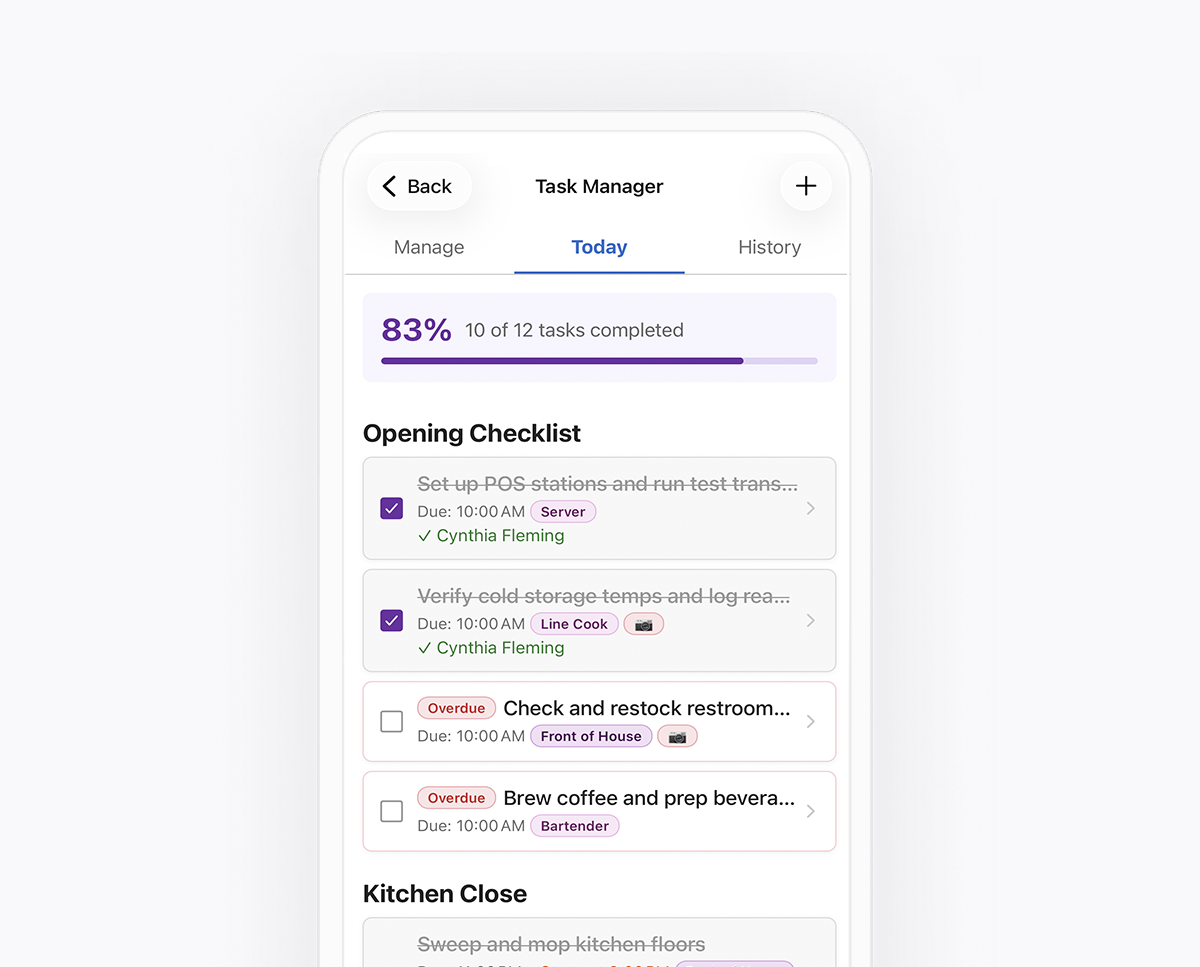
A task without a deadline is a suggestion. Good apps let you set a window — when the work can start and when it must be finished — which turns a vague expectation into a measurable one. Each teamsly task or list gets a start time and a due time. After the due time, anything unfinished flips to overdue on the employee's phone and the manager's dashboard, and anything finished after it is recorded as late. Overdue usually means something was missed; late usually means the window is too tight. Different problems, different fixes.
4. Checklists for routines, single tasks for everything else
Some work is a sequence — the twelve steps of a kitchen close — and some is a one-off, like "call the plumber about the back sink." In teamsly, a task list bundles related items into one routine, and a single task handles ad-hoc work. You can drag list items into the order they're actually done; since items in a list share its time window, anything with its own deadline works best as a single task.
5. Photo proof for the tasks where it matters
A checkmark tells you someone tapped a box. A photo shows you the clean prep line or the locked back door. Look for an app that lets you require photos on specific tasks rather than all of them, so proof stays meaningful instead of becoming busywork. In teamsly, a photo-required task can't be completed until the employee takes the photo. They can add a note too — "out of sanitizer refills" is far more useful at 10 PM than at 9 AM — and managers review photos and notes on web or mobile.
Require a photo where it answers a real question. If nobody is going to look at it, it isn't proof — it's paperwork.
6. A mobile app employees will actually open
Frontline employees don't sit at computers, so a task app lives or dies on its phone experience. In the teamsly mobile app, assigned work appears on the employee's Home screen, and a few minutes into a scheduled shift, anyone with tasks waiting gets a push notification: "You have tasks to complete during your shift today." Because tasks live in the same app as the schedule, the time clock, and team chat, there's no second app to download.
7. Built-in Spanish for bilingual teams
If part of your crew reads Spanish more comfortably than English, an English-only checklist is a quiet source of missed steps. Teamsly automatically translates task titles, descriptions, and notes for employees who use the app in Spanish, so a manager writes the closing list once and everyone reads it in their own language — no duplicate lists, and no relying on the one bilingual closer to translate.
8. A live dashboard, a real history, and reports you can export
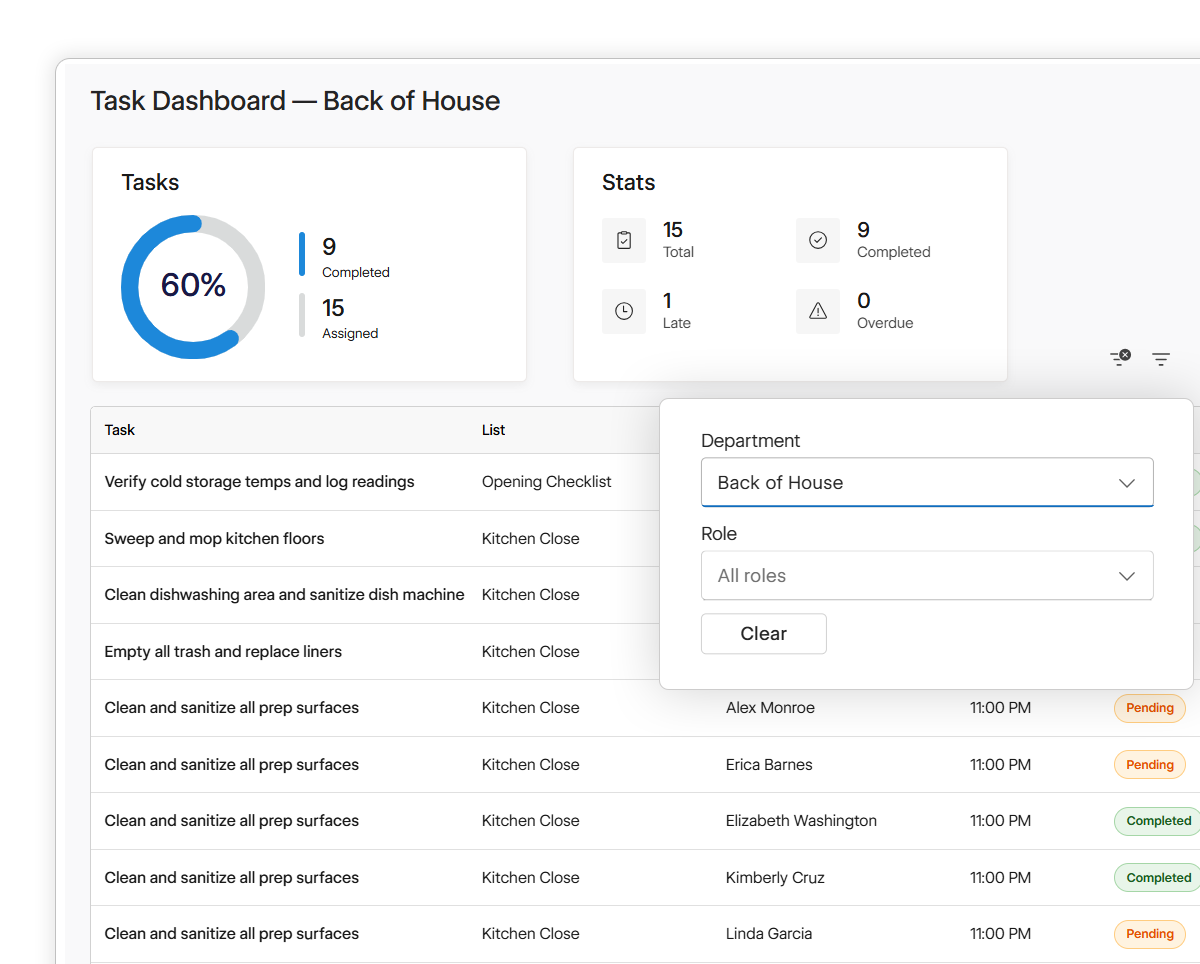
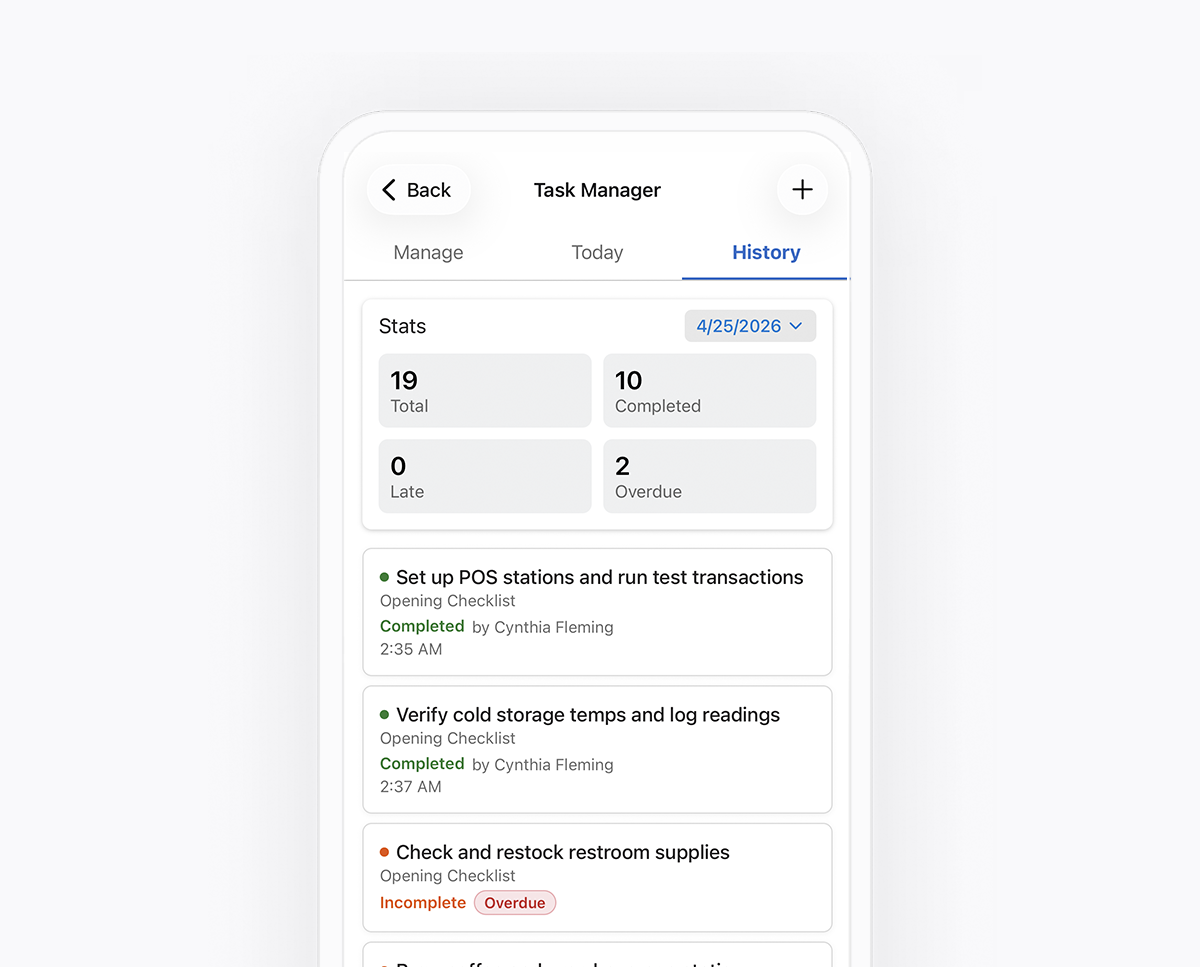
Finally, the manager's side. You need three views: what's happening right now, what happened on any past day, and how things are trending. The teamsly Task Dashboard updates live as tasks are checked off, with totals for completed, late, and overdue work, and filters by department or role. The History tab shows every task for any date — who completed it, when, and the photos and notes attached. And the Task Completion Report rolls any date range into completion rates you can export to CSV for an owner meeting or a franchise review.
Five questions to ask in any task app demo
Bring a real routine — your actual closing list — and ask the rep to set it up live while you watch.
- Can I assign this list to a role or department instead of retyping names every week?
- If tonight's list isn't finished, does tomorrow's still appear — and does tonight's miss stay on the record?
- Can I require a photo on only the tasks that need one, and block completion without it?
- Can I see late and overdue separately, filtered by department or role?
- Will my Spanish-speaking staff read tasks in Spanish without me maintaining a second list?
How to write a task nobody can misread
Software won't rescue a vague task. "Cooler" leaves a dozen questions open; a well-written task answers them before anyone has to ask. Here's the anatomy of one, using a temperature check from a restaurant's opening checklist.
1Check the walk-in cooler temperature and log the reading.
2Assigned to: Line Cook (role). Whoever is on the line this morning owns it.
3Due by 8:45 AM, before the line is stocked for service.
4Photo required: the thermometer display. If it reads above 41°F, add a note and tell the manager on duty.
Verb first, specific object
"Check the walk-in cooler temperature" beats "Cooler." Anyone should know what to do from the title alone.
A role, not a name
The task follows the schedule. No reassigning it every week when shifts change.
A deadline tied to what comes next
The due time comes from the next step in the day, not habit — so "late" actually means something.
Proof plus an escalation rule
The photo answers "was it checked?" The note answers "what happens if it's wrong?"
41°F is the cold-holding limit in the FDA Food Code; use whatever standard your local health department enforces. The same four-part structure — clear action, owner, deadline, proof — works for any task, from restocking a display to locking up at night.
Sample employee checklists for opening, closing, and cleaning
Use these as starting points and adjust them to your space. Each card shows how often the task repeats and whether it's worth requiring a photo. Keep lists short — eight to twelve items is plenty for one routine — and split anything longer by station or area.
Restaurant
Closing side work
Break down, clean, and sanitize the prep line and cutting boards.
Label, date, and store all prep; toss anything past its use-by date.
Restock server stations: napkins, to-go containers, and condiments.
Deep-clean the dish pit and descale the dish machine.
Retail
Store opening
Count the register drawer and note any variance before the doors open.
Face and fill the front table and endcaps.
Clear fitting rooms and return holds and go-backs to the floor.
Check price tags and signage against the current promotions.
Cleaning crew
Nightly office route
Clean and restock restrooms: soap, paper, and trash liners.
Empty all trash and recycling and replace the liners.
Vacuum high-traffic areas and spot-clean the entry glass.
Detail the break room: fridge clean-out, microwave, and counters.
The same structure works anywhere work repeats: room turnover and supply checks at a clinic, linen rounds at a hotel, equipment wipe-downs at a gym, or a truck inspection before a field crew leaves the yard. If new hires will be running these routines, pair them with a 30-60-90 day onboarding plan and short mobile training lessons, so people learn the standard before they're asked to prove it.
I needed something my whole kitchen would actually use. The fact that every employee can read everything in Spanish was the thing that made it stick.
— El Patrón Taquería & Cantina, San AntonioEl Patrón, a taquería with a crew of roughly 40, moved its prep lists, server side work, and closing checklists out of an office notebook and into teamsly. Each list is assigned to a role and repeats on the right days, and tasks like walk-in temperature checks and sanitized prep tables require a photo. Read the full El Patrón story.
A day in the life of one checklist in teamsly
Here's what a single opening checklist looks like from setup to the next morning — for the manager who builds it, the employee who works it, and the owner who checks it later.
The opening checklist, start to finish
A café with a 6:30 AM opening shift, doors at 9:00 AM, and one checklist assigned to the Opener role.
Priya, the manager, builds the list once.
In Task Manager, she creates "Opening checklist," assigns it to the Opener role, sets a 6:30 AM start and an 8:45 AM due time, picks Daily, requires photos on the cooler and pastry-case tasks, and publishes it. It repeats from there.
Marco, the opener, gets a nudge.
A few minutes into his shift, a push notification tells him he has tasks to complete today. The list is waiting on his Home screen — in Spanish, if that's the language he uses the app in.
Work gets checked off as it's done.
Marco checks items off as he goes, snaps the required photos, and adds a note: "Two cartons of oat milk left — reorder." Priya sees the progress and the note from her phone without sending a single "how's it going?" text.
The due time passes.
The last open task flips to Overdue on Marco's phone and on the dashboard. If he finishes it at 8:52, it's recorded as late — done, but worth a look if it keeps happening.
Still open two hours later?
Managers at the location get an overdue alert, and anyone assigned the task directly gets a reminder of their own.
A fresh list and a permanent record.
Tomorrow's checklist appears on its own. Today's results stay in History: who did what, when, and every photo and note.
The task metrics worth watching
Once tasks are flowing, the data tells you where your operation is actually breaking. Four numbers do most of the work:
- Completion rate: completed tasks divided by assigned tasks. Your headline health check.
- On-time rate: the share finished before the due time. High completion with low on-time means the work gets done, just not when it's needed.
- Overdue count: tasks still open after their deadline. These are today's fires.
- Repeat misses by list: the same routine running late week after week — almost always a process problem, not a people problem.
On-time completion by checklist, last 30 days
Illustrative example for one café. The pattern matters more than the numbers.
In a report like this, nobody needs a lecture about the opening checklist. The weekly deep clean is the outlier, and the cause is usually structural: it's scheduled on the busiest night, it's too long for one person, or nobody was ever shown how to do it. Move the window, split the list, or hand it to a role with slower hours, then watch the number move. It's the same root-cause thinking that works for cutting down on no-shows: fix the system before you blame the people in it.
How to roll out an employee task app in 30 days
The fastest way to fail is to move every checklist on day one. Start small, prove it works, and let the team feel the payoff before you expand.
Move the list you chase most
- Pick one routine that gets missed often — usually closing.
- Rewrite each item verb-first, assign it to a role, and require photos on two or three items, no more.
- Show the team where tasks live in the app during a pre-shift huddle.
Add the next two routines
- Add opening plus one weekly task, like a deep clean or inventory count.
- Retire the paper version of anything now in the app. Running both kills adoption.
- Check the dashboard at the same two times every day: before open and before close.
Read the report and adjust
- Find the list with the lowest on-time rate and fix its window, length, or owner before blaming anyone.
- Delete tasks nobody needs. Stale tasks teach people to ignore the list.
- Copy the setup to your next location or department.
The bottom line
An employee task management app isn't really about tasks. It's about clarity: every person knowing what's theirs, when it's due, and what "done" looks like — and every manager being able to see it without walking the floor or sending a text. Get that right and the checklists take care of themselves.
Teamsly's Task Manager was built for exactly that: task lists and single tasks assigned by role, department, or person; daily and weekly recurrence; photo proof; automatic Spanish translation; and a live dashboard, history, and exportable report — in the same app your team already uses for the schedule and the time clock. You can try teamsly free for 30 days or explore the live demo first.
Frequently asked questions
What should I look for in an employee task management app?
Look for assignment by role or department, recurring tasks that generate automatically, start and due times with separate late and overdue tracking, optional photo proof, a mobile app employees will actually open, language support for bilingual teams, and a live dashboard with an exportable history. Teamsly's Task Manager includes all of these in the same app as scheduling, the time clock, and team chat.
How is an employee task management app different from a to-do list app?
To-do and project apps are built for individuals who own their work for days or weeks. Employee task management apps are built for teams that share work across shifts: tasks are assigned to roles or departments, repeat on a schedule, belong to a specific location, can require photo proof, and leave a dated record managers can review by day, person, or list.
How do I know a task was actually done?
Start with a completion record that shows who checked the task off and when. For tasks where a picture answers the question, such as a stocked cooler or a sanitized prep table, require a photo; in teamsly, a photo-required task can't be completed until the photo is uploaded. Back that up with occasional in-person spot checks, because a photo only shows what's in the frame.
What's the difference between a late task and an overdue task?
An overdue task is still unfinished after its due time. A late task was completed, but after its due time. Tracking them separately helps you tell a missed task apart from a deadline that's simply too tight.
Does teamsly's Task Manager work for Spanish-speaking employees?
Yes. Task titles, descriptions, and notes are automatically translated for employees who use the teamsly app in Spanish, so managers can write each checklist once for the whole team.
When should I use a task instead of a form or audit?
Use a task when the question is simply whether something got done: a clear action with an owner and a due time. Use a form or audit when you need structured answers, such as multiple fields, signatures, or a scored inspection. Teamsly includes both, so checklists live in Task Manager and inspections live in forms and audits, in the same app.
Stop chasing checklists. Start seeing them done.
Assign tasks by role, repeat them automatically, require photo proof, and watch completion roll in live — in the same app as your schedule and time clock.
Keep reading
- Jim Harter, Gallup, U.S. Employee Engagement Below 30% for First Time in 15 Years, October 28, 2026. In Gallup's Q3 2026 survey, 46% of U.S. employees strongly agreed they know what is expected of them at work, compared with a high of 61% in 2015. gallup.com
- On-time completion and assignment-speed figures are from the teamsly Task Manager feature page. The on-time completion chart in section 07 is an illustrative example, not customer data.